
Give each product photo a question to answer before you shoot: what is the whole item, which detail needs a closer look, and what context helps explain it? Select the finished set against those questions, not just against how attractive each image looks. Keep the actual product variant consistent and distinguish styling props from included items.
Agree on the destination and the questions
Ask where the images will be used and what the recipient needs to understand. A portfolio exercise, a social post and a product listing may ask different things of the same item. Confirm the requested views, variant and delivery requirements before choosing the set. If a brief simply asks for “product photos,” clarify which details matter rather than guessing a fixed image count.
Google Merchant Center is one concrete example of why the destination matters. Its main-image guidance calls for accurately showing the entire product with minimal or no staging and matching the correct variant. Its additional-image guidance allows different angles, staged or in-use views, and images highlighting a part of the product. These are Google-specific distinctions, not universal instructions for every UGC portfolio or marketplace.
Check the current requirements for the actual destination. A useful detail crop is not automatically suitable as a main listing image, and the exercise below does not establish that any listing has been approved. Translate the agreed purpose into a short question you can answer visibly, such as “What does the zipper and surrounding seam look like?”
Plan views that complement one another
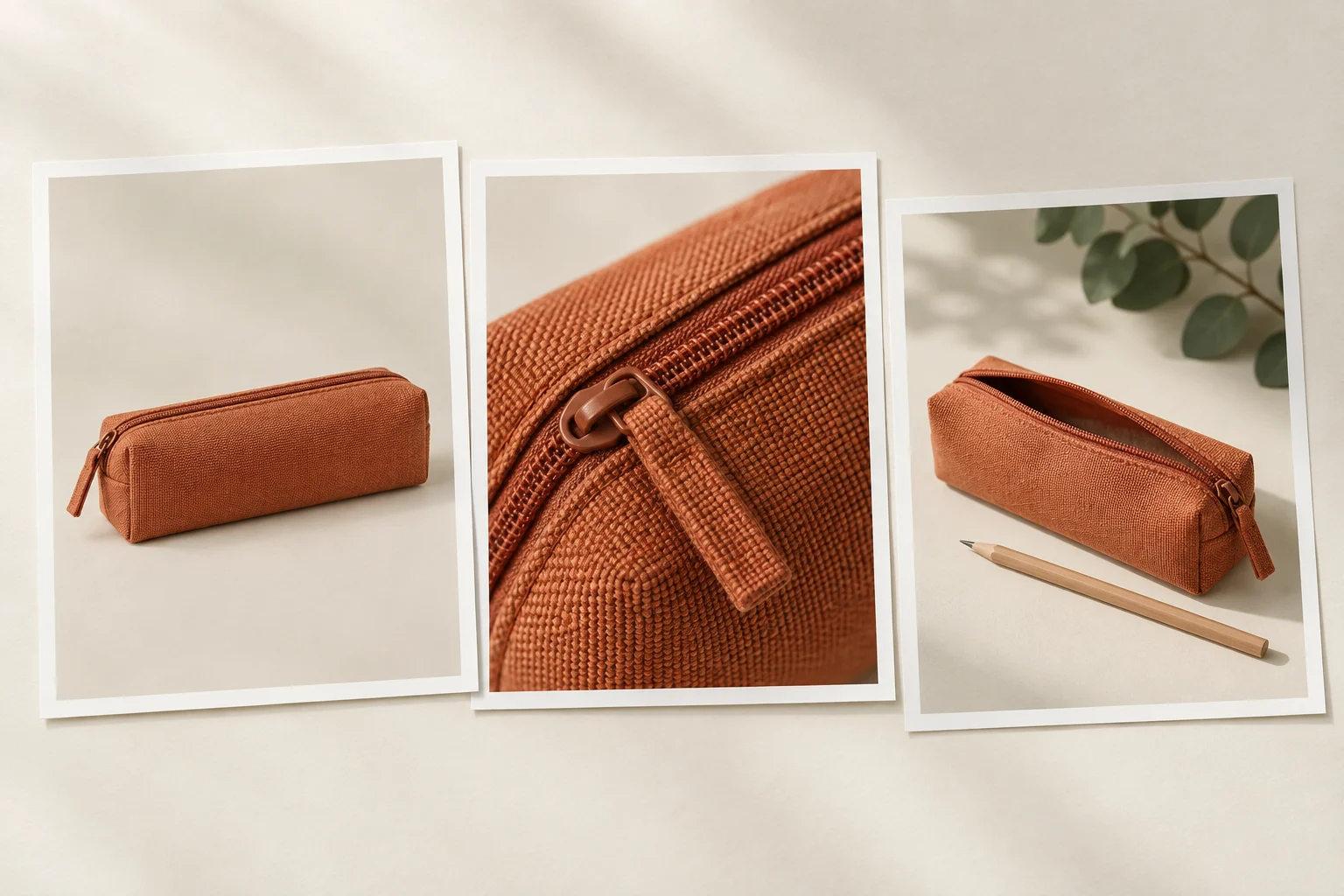
Consider a fictional terracotta fabric pencil case sold on its own. This three-view exercise illustrates different jobs; three is not a required package size. The pencil in the context view is a separate styling prop, not part of the product. The generated cover is an illustration of the plan, not a record of a performed shoot.
Fictional still-photo coverage plan
Scroll sideways to see all columns.
| Question | Proposed view | Check before selecting |
|---|---|---|
| What is the whole item? | The closed pencil case, fully within the frame on a simple background. | The agreed case and color are shown; its overall shape is clear and no edge needed to understand it is cut off. |
| What does the requested detail look like? | A closer view of the zipper and adjacent stitching. | The requested detail is actually visible and sharp enough to inspect. Another distant angle does not fill this job. |
| How does it sit in the proposed context? | The same case open on a desk, with a wooden pencil lying separately beside it. | The case remains identifiable. The pencil is recorded as a styling prop; the use of the image must not suggest it is included. |
For a real assignment, use the actual item and variant requested. Check color, pattern, closures and visible accessories across the set. If a frame uses another sample or variant, identify it and resolve the mismatch instead of silently combining it with the others. Do not edit a product into a different color or remove a real feature just to make the set look more uniform.
A close-up can show visible stitching or texture. It does not demonstrate waterproofing, durability or certified material composition. Likewise, placing a pencil beside the case does not measure its capacity or dimensions. Keep descriptions within what the real image and verified product information support.
Choose the set for coverage, not repeated angles
Imagine the first selection contains two attractive closed-case views and an open-case desk view, but neither closed view lets you inspect the requested zipper detail. You still have three images, but one agreed question remains unanswered. Keep the stronger whole-item view, then make or select a usable detail image. Adding another similar angle does not solve the missing detail.
This is a fictional selection decision, not a claim that a photo session was carried out. In practice, review the actual files at a size that lets you inspect the required feature. Compare the selected images together as well as individually: the item should remain recognizable, and a change in crop or styling should have a purpose.
- Reject an image that hides the feature it was meant to explain, even if the background is attractive.
- Check that focus and exposure leave the requested detail readable in the selected file.
- Compare visible color and material with the actual item; consistent editing must not invent a different variant.
- Keep props subordinate to the product and clarify included contents in the intended presentation. A private prop note alone does not correct a misleading public listing.
Resolve an unclear brief or missing view before calling the set complete. If the brand later changes the destination, variant or required detail, revisit the affected selection rather than assuming the old set still answers the new request.
Keep a short record of the selected files
Use this record to connect each agreed question to a specific file. Fill the plan before shooting; fill the selected file and completed checks only after inspecting the actual photographs. Keep an unresolved item visible instead of filling the row with a nearby substitute.
Product photo selection record
Intended destination and agreed use:
Actual item and variant:
Question this photo must answer:
Planned view and required visible detail:
Selected filename/version, after review:
Included items visible:
Separate styling props visible:
How the intended presentation distinguishes props from included items:
Missing detail or variant mismatch:
Decision and next action:
Reviewer and review date:
For self-initiated portfolio work, explain that it is practice and describe the choices you actually made. For a commissioned set, confirm that the selected files cover the agreed views and any open points are resolved. Then prepare the agreed exports and delivery list. Good selection is a traceable answer to the brief, not a promise of sales or a substitute for destination-specific requirements.
How this fits UGC Stage
UGC Stage is an application in development connecting creators and brands. Its planned creator portfolios let you present selected video, photo and voice samples. A self-initiated product photo set can help explain your framing and selection choices: identify the question each image answers and describe your actual role. Label practice work honestly and show work you have the right to display; an attractive set is not evidence of a past client or sales result. Prepare and review the photos with your own photography tools, then join the creator waitlist to hear when the application launches.
Explore the applicationSources and notes
Practical guidance from the UGC Stage team. Examples are educational, not customer results or income guarantees.